How to fix more than one media file is checked as primary

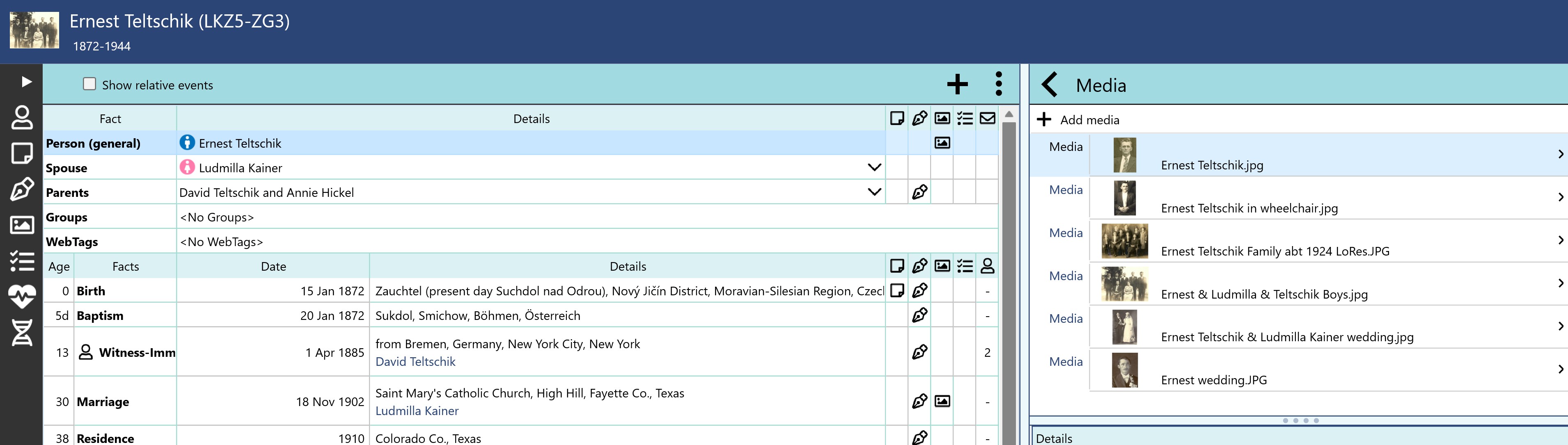
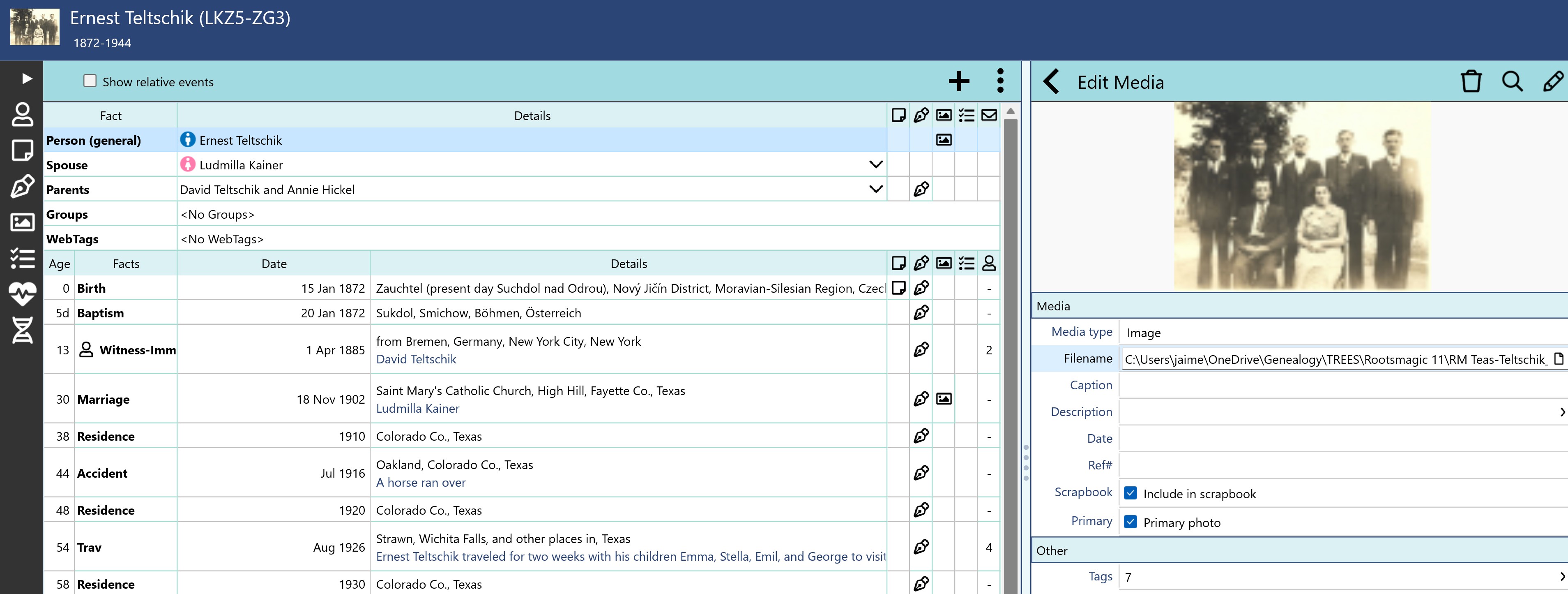
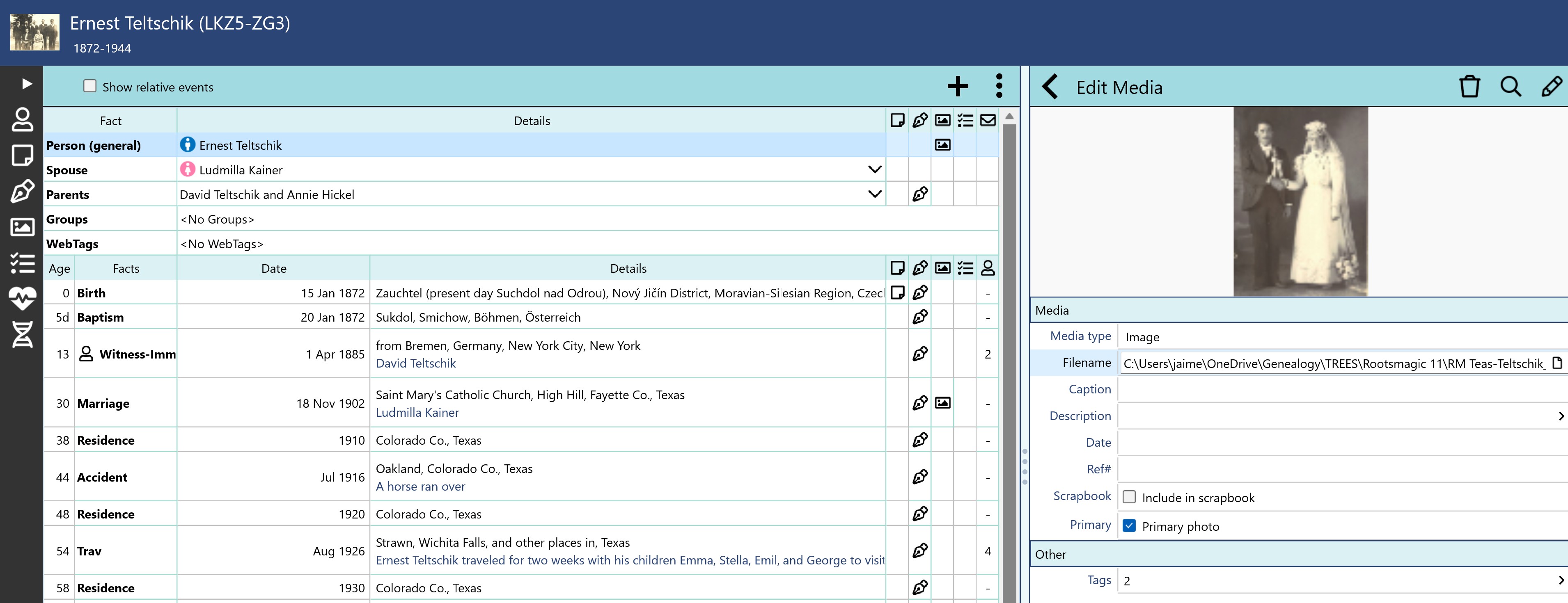
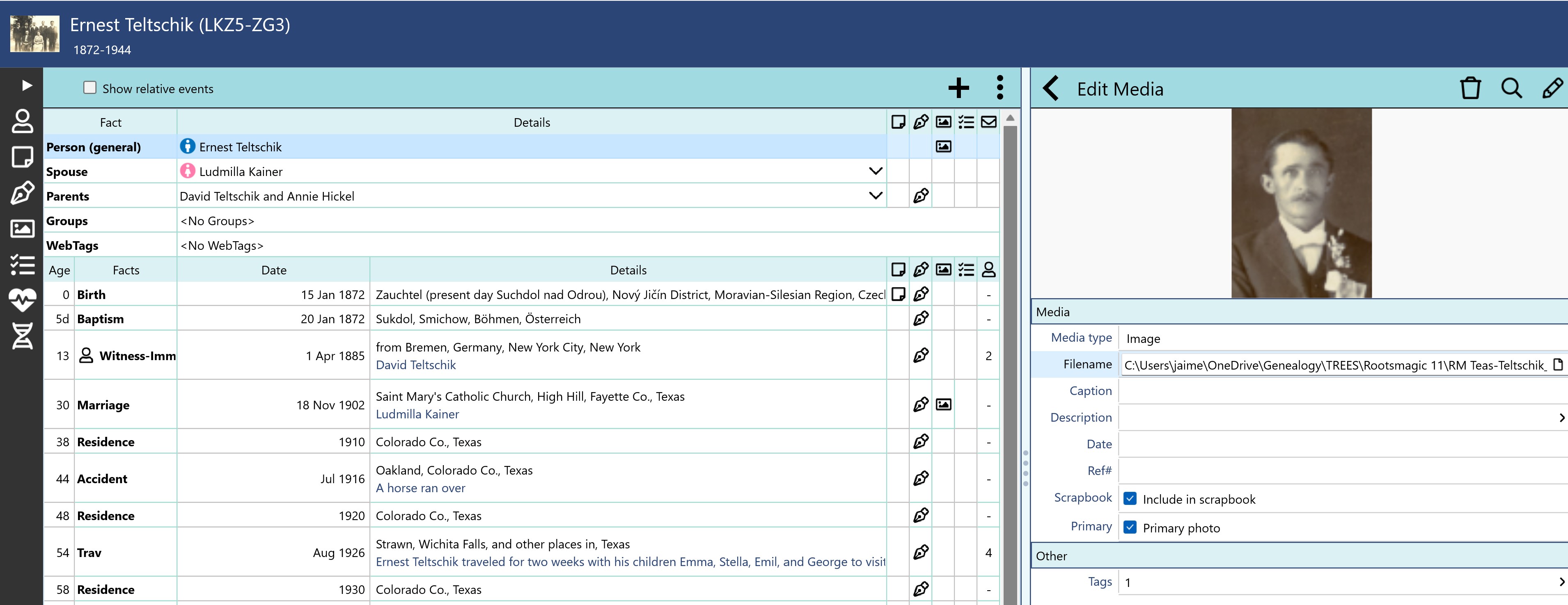
Quote from Jaime Teas on 2026-01-17, 8:02 amSomehow I have discovered than many people in my RM11 tree have more than one media file assigned as primary. I don't know how this is possible, as you cannot "make" this happen. I believe this might be the reason I cannot successfully upload my tree to Ancestry via Treeshare. If I choose not to include media, the tree uploads successfully, but if I include media it hangs (at various spots) while uploading media. I know there is a script to assign a media file as primary if none are checked as such, but is there a way to uncheck all primary media? You will see in the example below that a person can have many media files, but not all are checked as primary. Some media are shared with other people, and some are not, but there does not appear to be any consistency with this (in other words it appears to be very random).
Thanks for any help!
Jaime
Somehow I have discovered than many people in my RM11 tree have more than one media file assigned as primary. I don't know how this is possible, as you cannot "make" this happen. I believe this might be the reason I cannot successfully upload my tree to Ancestry via Treeshare. If I choose not to include media, the tree uploads successfully, but if I include media it hangs (at various spots) while uploading media. I know there is a script to assign a media file as primary if none are checked as such, but is there a way to uncheck all primary media? You will see in the example below that a person can have many media files, but not all are checked as primary. Some media are shared with other people, and some are not, but there does not appear to be any consistency with this (in other words it appears to be very random).
Thanks for any help!
Jaime
Quote from kevync on 2026-01-17, 10:54 amone other note -- it may impact things outside of RM
The other issue might be that when adding a new primary RM is not clearing off previous primary tagged photos
one other note -- it may impact things outside of RM
The other issue might be that when adding a new primary RM is not clearing off previous primary tagged photos
Quote from Jaime Teas on 2026-01-17, 11:39 amDid you post a message that I am not seeing? All I se is your message beginning “one other note”.
I know for sure that the problem was not caused by RM failing to remove a primary when changing to another because it is very widespread throughout my tree and includes all branches and I would not have changed so many primaries. Also the tree was created by drag and drop from another tree that does not have the problem and that synced via tree share successfully including media.
Did you post a message that I am not seeing? All I se is your message beginning “one other note”.
I know for sure that the problem was not caused by RM failing to remove a primary when changing to another because it is very widespread throughout my tree and includes all branches and I would not have changed so many primaries. Also the tree was created by drag and drop from another tree that does not have the problem and that synced via tree share successfully including media.
Quote from thejerrybryan on 2026-01-17, 12:08 pmHere is an AI assisted query that will find all your items in RM with more than one primary media file. I had a few of them myself - 4 out of about 3000. I wrote most of the query myself, but got AI assistance on one sticky point.
SELECT
ML.OwnerType,
ML.OwnerID,
ML.LinkID,
ML.MediaID,
ML.IsPrimary,
MM.MediaPath,
MM.MediaFile
FROM MediaLinkTable ML
JOIN MultiMediaTable MM
ON MM.MediaID = ML.MediaID
WHERE ML.IsPrimary = 1
AND EXISTS (
SELECT 1
FROM MediaLinkTable ML2
WHERE ML2.OwnerType = ML.OwnerType
AND ML2.OwnerID = ML.OwnerID
AND ML2.IsPrimary = 1
GROUP BY ML2.OwnerType, ML2.OwnerID
HAVING COUNT(*) > 1
)
ORDER BY ML.OwnerType, ML.OwnerID, ML.MediaID;To answer you main question literally, the following will clear all your IsPrimary flags. But are you sure you want to do that? I'm fixing my few problems one at a time by hand.
UPDATE MediaLinkTable
SET IsPrimary = 0
WHERE IsPrimary != 0;And the larger question of how they got that way, I have no idea. And to the even larger question of whether this is preventing TreeShare uploads, then that's a really good question.
One more little tidbit. My database had the following.
6490 media tags
5611 different items having media tags
577 different items having more than one media tag
4 different items having more than on primary media tagI have cleaned up the 4 items with more than one primary media tag manually. I'm a sample size of one and your mileage may vary.
Here is an AI assisted query that will find all your items in RM with more than one primary media file. I had a few of them myself - 4 out of about 3000. I wrote most of the query myself, but got AI assistance on one sticky point.
SELECT
ML.OwnerType,
ML.OwnerID,
ML.LinkID,
ML.MediaID,
ML.IsPrimary,
MM.MediaPath,
MM.MediaFile
FROM MediaLinkTable ML
JOIN MultiMediaTable MM
ON MM.MediaID = ML.MediaID
WHERE ML.IsPrimary = 1
AND EXISTS (
SELECT 1
FROM MediaLinkTable ML2
WHERE ML2.OwnerType = ML.OwnerType
AND ML2.OwnerID = ML.OwnerID
AND ML2.IsPrimary = 1
GROUP BY ML2.OwnerType, ML2.OwnerID
HAVING COUNT(*) > 1
)
ORDER BY ML.OwnerType, ML.OwnerID, ML.MediaID;
To answer you main question literally, the following will clear all your IsPrimary flags. But are you sure you want to do that? I'm fixing my few problems one at a time by hand.
UPDATE MediaLinkTable
SET IsPrimary = 0
WHERE IsPrimary != 0;
And the larger question of how they got that way, I have no idea. And to the even larger question of whether this is preventing TreeShare uploads, then that's a really good question.
One more little tidbit. My database had the following.
6490 media tags
5611 different items having media tags
577 different items having more than one media tag
4 different items having more than on primary media tag
I have cleaned up the 4 items with more than one primary media tag manually. I'm a sample size of one and your mileage may vary.
Quote from thejerrybryan on 2026-01-17, 2:04 pmHere are a couple of additional comments. First, despite the AI assisted version of the script working, I didn't like the look and feel of it. So I finally managed to write one that was totally one of my own that worked and that seemed simpler and more direct to me. Here is is.
SELECT A.OwnerType, A.OwnerID, ML2.MediaID, MM.MediaFile
FROM
(
SELECT ML.LinkID,
ML.MediaID,
ML.OwnerType,
ML.OwnerID,
COUNT(*) AS PrimaryCount,
MM.MediaFile
FROM (SELECT * FROM MediaLinkTable WHERE IsPrimary = 1) AS ML
JOIN MultiMediaTable AS MM ON MM.MediaID = ML.MediaID
GROUP BY ML.OwnerType, ML.OwnerID
HAVING PrimaryCount > 1
) AS A
JOIN MediaLinkTable AS ML2 ON ML2.OwnerType = A.OwnerType AND ML2.OwnerID = A.OwnerID
JOIN MultiMediaTable AS MM ON MM.MediaID = ML2.MediaID
ORDER BY A.OwnerType, A.OwnerIDThe key to me getting it to be cleaned up was just a different way to think about it where I moved the filter for IsPrivate inside a subquery for the MediaLinkTable. I'm doing that more and more - putting filters for just one table inside a subquery for just that table rather than having the filter out in a WHERE clause or a ON clause in the "global space" for the entire query. This technique is even more effective for the readability of a query when the "filter in a subquery" is done instead in a CTE. Then use the CTE with the simple filter as a table.
The other comment is that whether you use the AI version of the query or mine, it can be a little hard to use. The query will tell you two or more file names that are Primary for the same item in RM - namely the same ownertype and ownerid. But neither version of the query will tell you exactly what that item is or where it is. That's because media files can be tagged to people, families, names, individual events, family events, sources, citations, and maybe a couple of other things I'm forgetting. It can make an otherwise simple query about 10 times bigger to add all the JOIN's to all the tables to chase down all the items where the media file is linked.
Here's an example of how I worked the problem. In my database I had two files named greene_family_plot.jpg greene_cenie_grave_1953.jpg. They were both primary media files for the same Burial fact. The query didn't tell me that. It just told me they were primary for the same item somewhere in RM. I probably could have found them by the person's name, but that's not always the case. In this situation, I found them by looking at greene_cenie_grave_1953.jpg in RM in the main Media tab and looking at the Used items. From their, I edited the person which I could do directly from the media screen and looked at the Burial record. But there is no one perfect way to get just from the file name to get to where it's used along with another file name, both as primary media files. Absent a large and complicated query that follows all the media tag links for you, you just have to use your knowledge of the database a little bit.
Here are a couple of additional comments. First, despite the AI assisted version of the script working, I didn't like the look and feel of it. So I finally managed to write one that was totally one of my own that worked and that seemed simpler and more direct to me. Here is is.
SELECT A.OwnerType, A.OwnerID, ML2.MediaID, MM.MediaFile
FROM
(
SELECT ML.LinkID,
ML.MediaID,
ML.OwnerType,
ML.OwnerID,
COUNT(*) AS PrimaryCount,
MM.MediaFile
FROM (SELECT * FROM MediaLinkTable WHERE IsPrimary = 1) AS ML
JOIN MultiMediaTable AS MM ON MM.MediaID = ML.MediaID
GROUP BY ML.OwnerType, ML.OwnerID
HAVING PrimaryCount > 1
) AS A
JOIN MediaLinkTable AS ML2 ON ML2.OwnerType = A.OwnerType AND ML2.OwnerID = A.OwnerID
JOIN MultiMediaTable AS MM ON MM.MediaID = ML2.MediaID
ORDER BY A.OwnerType, A.OwnerID
The key to me getting it to be cleaned up was just a different way to think about it where I moved the filter for IsPrivate inside a subquery for the MediaLinkTable. I'm doing that more and more - putting filters for just one table inside a subquery for just that table rather than having the filter out in a WHERE clause or a ON clause in the "global space" for the entire query. This technique is even more effective for the readability of a query when the "filter in a subquery" is done instead in a CTE. Then use the CTE with the simple filter as a table.
The other comment is that whether you use the AI version of the query or mine, it can be a little hard to use. The query will tell you two or more file names that are Primary for the same item in RM - namely the same ownertype and ownerid. But neither version of the query will tell you exactly what that item is or where it is. That's because media files can be tagged to people, families, names, individual events, family events, sources, citations, and maybe a couple of other things I'm forgetting. It can make an otherwise simple query about 10 times bigger to add all the JOIN's to all the tables to chase down all the items where the media file is linked.
Here's an example of how I worked the problem. In my database I had two files named greene_family_plot.jpg greene_cenie_grave_1953.jpg. They were both primary media files for the same Burial fact. The query didn't tell me that. It just told me they were primary for the same item somewhere in RM. I probably could have found them by the person's name, but that's not always the case. In this situation, I found them by looking at greene_cenie_grave_1953.jpg in RM in the main Media tab and looking at the Used items. From their, I edited the person which I could do directly from the media screen and looked at the Burial record. But there is no one perfect way to get just from the file name to get to where it's used along with another file name, both as primary media files. Absent a large and complicated query that follows all the media tag links for you, you just have to use your knowledge of the database a little bit.
Quote from kevync on 2026-01-17, 2:24 pmQuote from kevync on 2026-01-17, 10:54 amone other note -- it may impact things outside of RM
The other issue might be that when adding a new primary RM is not clearing off previous primary tagged photos
not sure why my post was not visible.
I suspect the media issue you are experiencing might be do downloading from places like Ancestry. Since I moved to RM (5 years ago) I have manually downloaded, renamed, and manually attached media. I suspect since the media was likely not changed with RM UI it came by default with the Primary media "checked" and the db got update that way. RM seems to clear the primary when a new one is checked (This is what I would expect it to do). one question if it is mostly people /media or if facts are always involved.
The path to the least amount of work is what you need to decide on once you know better what is going on. Once you clean things up -- I might consider monitoring things daily or so -- so you can figure out where the gremlins are coming from.
Quote from kevync on 2026-01-17, 10:54 amone other note -- it may impact things outside of RM
The other issue might be that when adding a new primary RM is not clearing off previous primary tagged photos
not sure why my post was not visible.
I suspect the media issue you are experiencing might be do downloading from places like Ancestry. Since I moved to RM (5 years ago) I have manually downloaded, renamed, and manually attached media. I suspect since the media was likely not changed with RM UI it came by default with the Primary media "checked" and the db got update that way. RM seems to clear the primary when a new one is checked (This is what I would expect it to do). one question if it is mostly people /media or if facts are always involved.
The path to the least amount of work is what you need to decide on once you know better what is going on. Once you clean things up -- I might consider monitoring things daily or so -- so you can figure out where the gremlins are coming from.
Quote from Jaime Teas on 2026-01-18, 12:18 amJerry and Kevync, See attached picture of what I get when I run the 2nd script (or the first for that matter). I used SQLite Expert Personal. Am I supposed to enter something manually (i.e. a filter?) If so, what and where do i type it in? I appreciate your detailed thought process and method about the script, and hope that it will be of help to others more familiar with SQL. It is totally lost on me!
I think the problem came from dragging/dropping from one database to another - and it is interesting (and validating!) that you have a few people with the same problem. I didn't notice it until after I started editing some of the people in the newly created tree. If it had happened gradually via treeshare, I think I would have noticed a long time ago. I think I can safely say that the problem with multiple primary media tags is restricted to person media only, not facts or events, etc.
Of course I would rather not have to uncheck all media for every person, because the majority of people with photos do not have the problem, but there appears to be too many for me to manually edit. But how can I tell how many are problematic? (like your comment about your tree 6490 media tags
5611 different items having media tags
577 different items having more than one media tag
4 different items having more than on primary media tag) Per Enhanced Properties, my tree has 67K people, about 39K media files, and about 394K media links. My hope is that after unchecking all primary media, I can attempt the script that tags the first media file (if multiples) as the primary and then, fingers crossed, I will be able to upload the tree with the media to Ancestry. I believe you said you use Ancestry for hints and a backup of your RM file on your computer .... and that is exactly what I do too.Thank you both and hope you are having a nice weekend!
Jaime
Jerry and Kevync, See attached picture of what I get when I run the 2nd script (or the first for that matter). I used SQLite Expert Personal. Am I supposed to enter something manually (i.e. a filter?) If so, what and where do i type it in? I appreciate your detailed thought process and method about the script, and hope that it will be of help to others more familiar with SQL. It is totally lost on me!
I think the problem came from dragging/dropping from one database to another - and it is interesting (and validating!) that you have a few people with the same problem. I didn't notice it until after I started editing some of the people in the newly created tree. If it had happened gradually via treeshare, I think I would have noticed a long time ago. I think I can safely say that the problem with multiple primary media tags is restricted to person media only, not facts or events, etc.
Of course I would rather not have to uncheck all media for every person, because the majority of people with photos do not have the problem, but there appears to be too many for me to manually edit. But how can I tell how many are problematic? (like your comment about your tree 6490 media tags
5611 different items having media tags
577 different items having more than one media tag
4 different items having more than on primary media tag) Per Enhanced Properties, my tree has 67K people, about 39K media files, and about 394K media links. My hope is that after unchecking all primary media, I can attempt the script that tags the first media file (if multiples) as the primary and then, fingers crossed, I will be able to upload the tree with the media to Ancestry. I believe you said you use Ancestry for hints and a backup of your RM file on your computer .... and that is exactly what I do too.
Thank you both and hope you are having a nice weekend!
Jaime
Uploaded files: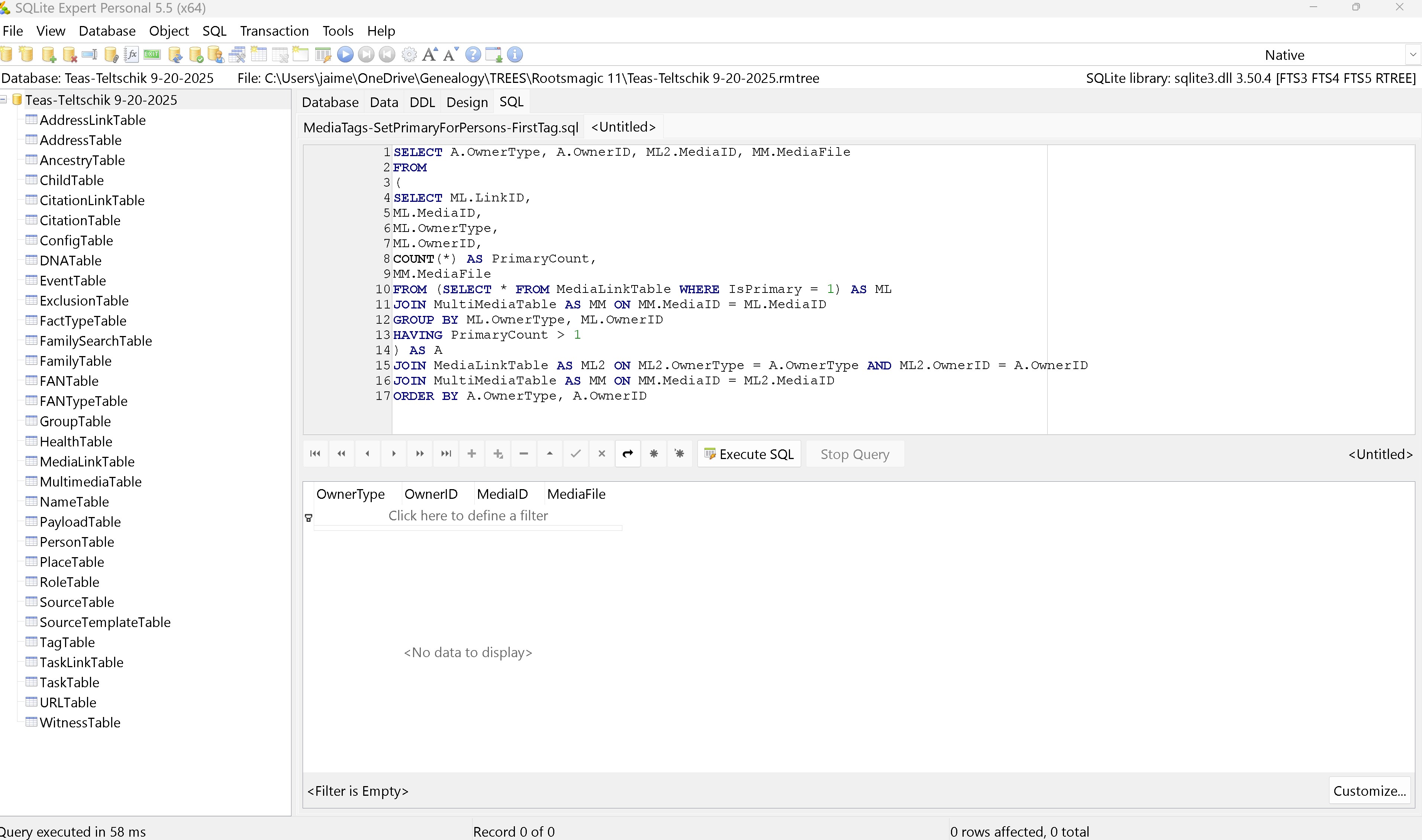
Quote from kevync on 2026-01-18, 9:46 amby chance in most (or all) cases is the media attached to more than one person?
I suspect the drag n drop in not doing much clean up for things like that.
Not sure how much is coming from the MediaLinks table vs MediaTable (MultiMedia Table). In some ways this somewhat similar to Merge duplicate citations & merge duplicate sources (but there is not a tool for that in RM UI)
by chance in most (or all) cases is the media attached to more than one person?
I suspect the drag n drop in not doing much clean up for things like that.
Not sure how much is coming from the MediaLinks table vs MediaTable (MultiMedia Table). In some ways this somewhat similar to Merge duplicate citations & merge duplicate sources (but there is not a tool for that in RM UI)
Quote from thejerrybryan on 2026-01-18, 11:20 amAll of my duplicate IsPrimary flags are attached to facts, either my custom Marriage Record fact or my custom Burial Inscription fact. I fixed them by going to the file name in the main Media tab and following the Used link to the Edit Person screen for the person. I simply turned the flag off the the link I wanted to keep, and then turned it back on. Then turning it back on turned it off for the other duplicate links. RM obviously has logic to turn off the other duplicate IsPrimary flags when you turn one on, so toggling as I did avoided having to look at all the instances of the IsPrimary.
The attached screen grab is from running the script against an archival copy of my RMTREE file where I haven't fixed the problem.
I was unable to upload the old archival file to TreeShare. It hung after nearly finishing as so many TreeShare users have described through the years. So I made a file level copy of the RMTREE file that still has the duplicate IsPrimary flags, fixed them in the copy, and tried to upload that to Ancestry. That also hung. So I don't think we can blame the duplicate IsPrimary flags for the failure to upload to Ancestry.
In my screen capture, there are 4 files with the problem, and 9 links with the problem - 3 links for the first file and 2 links for the other 3 files. This is out of nearly 7,000 media files. So most don't have the problem. I do wonder if the new Drag and Drop may be implicated in the problem, since I have used it a few times to recover a tiny bit of data from an archived RMTREE file. Like what if you drag and drop a person with a fact with the IsPrimary flag on into your database and merge them with another copy of the same person who already as the IsPrimary flag on for the same media file but for a different fact. I also wonder if the new Copy Fact tool might be implicated, since I use it quite a bit - like if you copy a fact with a media file with IsPrimary to a new person who already has a fact where IsPrimary is already on for the same file.
All of my duplicate IsPrimary flags are attached to facts, either my custom Marriage Record fact or my custom Burial Inscription fact. I fixed them by going to the file name in the main Media tab and following the Used link to the Edit Person screen for the person. I simply turned the flag off the the link I wanted to keep, and then turned it back on. Then turning it back on turned it off for the other duplicate links. RM obviously has logic to turn off the other duplicate IsPrimary flags when you turn one on, so toggling as I did avoided having to look at all the instances of the IsPrimary.
The attached screen grab is from running the script against an archival copy of my RMTREE file where I haven't fixed the problem.
I was unable to upload the old archival file to TreeShare. It hung after nearly finishing as so many TreeShare users have described through the years. So I made a file level copy of the RMTREE file that still has the duplicate IsPrimary flags, fixed them in the copy, and tried to upload that to Ancestry. That also hung. So I don't think we can blame the duplicate IsPrimary flags for the failure to upload to Ancestry.
In my screen capture, there are 4 files with the problem, and 9 links with the problem - 3 links for the first file and 2 links for the other 3 files. This is out of nearly 7,000 media files. So most don't have the problem. I do wonder if the new Drag and Drop may be implicated in the problem, since I have used it a few times to recover a tiny bit of data from an archived RMTREE file. Like what if you drag and drop a person with a fact with the IsPrimary flag on into your database and merge them with another copy of the same person who already as the IsPrimary flag on for the same media file but for a different fact. I also wonder if the new Copy Fact tool might be implicated, since I use it quite a bit - like if you copy a fact with a media file with IsPrimary to a new person who already has a fact where IsPrimary is already on for the same file.
Uploaded files: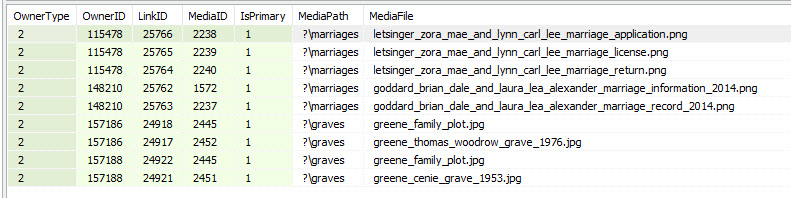


Quote from thejerrybryan on 2026-01-18, 11:38 amI'm not going to edit my most recent post, but I think most of my theorizing about causes was bogus. The problem is only for when more than one media file for the same item is marked IsPrimary. Copying facts and merging people couldn't do that when the item is a fact like what I have because RM never merges facts. So, bogus. But maybe the same idea could still apply when the media files are tagged to the person record (the PersonTable) because RM does merge those.
I'm not going to edit my most recent post, but I think most of my theorizing about causes was bogus. The problem is only for when more than one media file for the same item is marked IsPrimary. Copying facts and merging people couldn't do that when the item is a fact like what I have because RM never merges facts. So, bogus. But maybe the same idea could still apply when the media files are tagged to the person record (the PersonTable) because RM does merge those.